Building a WebRTC Voice AI Server from Scratch in Go
- Published on
- Arnab Mondal--19 min read
Overview
- The Feynman Approach: Why I Built It Myself
- Why Voice AI Can't Just Use HTTP
- The Architecture at 30,000 Feet
- The Transceiver: Terminating WebRTC in Go
- Chaining STT, LLM, and TTS for Real-Time Response
- The Load Balancer Problem Nobody Talks About
- Self-Routing Packets: Smuggling Destination IPs into Media Headers
- The Relay: A Phonebook and a Read Loop
- What's Next?
The Feynman Approach: Why I Built It Myself
I recently came across an engineering write-up on how OpenAI architected their realtime voice infrastructure—a fleet of stateful WebRTC servers hiding behind a custom UDP relay. Fascinated by how they achieved continuous voice interaction, I stopped being satisfied with just reading about it—as Richard Feynman put it, "What I cannot create, I do not understand." So I decided to build the entire system from scratch in Go: a miniature version featuring a stateless UDP relay load balancer, a WebRTC transceiver built on Pion, and a voice pipeline with swappable speech-to-text, LLM, and text-to-speech adapters. This post is that journey—part case study, part tutorial.
Why Voice AI Can't Just Use HTTP
Before any code, let's understand the constraint that shapes everything: latency.
In a voice conversation, anything above roughly 500ms of response delay feels broken. Humans notice gaps in conversation that they'd never notice in a chat UI. That single constraint eliminates most of the comfortable tools we normally reach for:
- HTTP request-response is out. You can't wait for the user to finish speaking, upload a file, and poll for a response.
- TCP itself is problematic. TCP guarantees ordered delivery, which means one lost packet blocks everything behind it (head-of-line blocking). For audio, a 20ms gap you never notice is better than a 200ms freeze while TCP retransmits.
- So we need UDP. Fire-and-forget packets. Lost audio frames are simply... lost, and the conversation moves on.
This is exactly why WebRTC exists—it gives browsers a standard way to stream media over UDP with encryption, codec negotiation, and NAT traversal already solved.
So the transport question is settled: WebRTC over UDP. What's left is everything that has to be built on top of it.
The Architecture at 30,000 Feet
Before diving into any single piece, here's the whole path a spoken sentence takes:
While the diagram shows individual stages, the entire system groups into three core building blocks:
- The Relay — A thin, stateless UDP forwarder at the front door. It receives audio packets from your mic and routes them to the right server.
- The Transceiver — The stateful WebRTC engine. It decrypts incoming traffic, decodes compressed Opus audio into raw PCM samples, and manages connection state.
- The Voice Pipeline — The streaming AI adapter chain: speech turns into text (STT), text feeds into the model (LLM), and text synthesizes back into voice (TTS).
Once the AI replies, the audio flows in reverse: synthesized PCM is encoded back into Opus, sent through the transceiver and relay, and played through your speaker.
We'll build this in two parts: first, a single-server setup combining the Transceiver and Voice Pipeline for a 1-on-1 conversation. Then, we'll build the Relay to handle multi-server routing and load balancing.
The Transceiver: Terminating WebRTC in Go
A transceiver (transmitter + receiver) is the media engine of a WebRTC server. We need it because browsers don't stream raw audio—they send encrypted, compressed UDP packets. The transceiver terminates that WebRTC connection: it handles ICE network discovery, DTLS handshake, SRTP encryption, and Opus codec decoding.
It acts as a translator: decrypting incoming traffic into raw PCM audio for the AI, and encoding synthesized speech back into WebRTC packets. To build this in Go without C++ dependencies, I used Pion—the Go equivalent of Google's native libwebrtc engine.
The design decision that shaped everything else was strict separation: the AI pipeline has no idea WebRTC even exists. The entire AI engine connects through just two plain Go channels—one for incoming mic audio (audioIn) and one for outgoing AI speech (audioOut). By hiding all WebRTC complexity behind this boundary, I could test the entire AI pipeline locally using plain audio files—completely independent of browser handshakes, UDP relays, or network code.
Building it surfaced three tricky edge cases that only appeared once code hit reality. Here's how each got solved.
Problem 1: conversations went silent after a few milliseconds. Before any audio flows, the browser and server introduce themselves via an HTTP POST request to exchange SDP credentials. Initially, I created the WebRTC session inside that HTTP handler. But an HTTP request ends in milliseconds, while a conversation lasts minutes: the moment the HTTP response finished, the server cleaned up the handler's memory, killing the audio stream with it.
The solution: separate the two lifetimes. The HTTP request only creates the session; what ends it is the WebRTC connection itself closing (the user hung up, or the network dropped). The signaling exchange is a birth certificate, not a life-support machine.
Problem 2: the codec silently refused to negotiate. During the SDP exchange, both sides have to agree on an audio codec. Browsers always advertise Opus as stereo—two channels—even when the microphone is mono. My server was configured for mono, Pion compares the two descriptions literally, and "mono" never equals "stereo." Result: no agreement, no audio, and no error message explaining why—until a quick check with an AI assistant pinpointed the exact SDP mismatch.
The solution: declare stereo in the SDP handshake to satisfy the browser, but configure the server's audio decoder to process a single mono channel. By separating the WebRTC SDP negotiation settings from the actual audio decoder, the browser gets the 2-channel handshake it expects while the AI pipeline gets clean mono audio.
Problem 3: when the AI fell behind, the whole conversation lagged forever. If the pipeline is momentarily slower than real time, incoming audio frames pile up. The initial instinct is to buffer everything so no audio is lost. But queued frames create permanent lag: one slow LLM response causes every subsequent sentence to be delayed by two seconds for the rest of the call.
The solution: drop late audio packets immediately. Using non-blocking Go channel sends (a select statement with a default drop case), if a new packet arrives while the channel buffer is full, the server simply discards it. A missing 20ms frame is inaudible to human ears, but a growing buffer ruins the conversation. In real-time voice streaming, late audio is useless audio—protecting latency matters far more than preserving every frame.
Once the transceiver delivers clean audio over Go channels, the networking layer is complete. What remains is feeding that audio stream into the AI engine.
Chaining STT, LLM, and TTS for Real-Time Response
On the other side of those channels sits the actual AI: three stages, and each one does something genuinely different with what flows through it.
Speech-to-text listens continuously, not in chunks. The raw PCM from the transceiver streams into the STT engine as it arrives, and the engine talks back the whole time: first as partial transcripts—"what I think you've said so far," revised as more audio arrives—and eventually as a final transcript once it decides you've finished a thought. That decision, called endpointing, is made from a few hundred milliseconds of silence plus the shape of the sentence. The final transcript is what triggers everything downstream.
The LLM turn is where the conversation actually lives. When a final transcript lands, it's added to the running conversation history—every previous exchange, plus a system prompt that sets the assistant's behavior—and the whole history goes to the model. That growing list of turns is the only memory the system has; there is no other conversation state anywhere. The model streams its reply back word by word rather than as one finished paragraph, and that detail matters more than anything else in this section.
Text-to-speech is a stream in both directions. Words flow in as the LLM produces them, and synthesized audio flows out in the same 20ms frames the rest of the system speaks—back through the transceiver, compressed to Opus, out to your ear. A good TTS engine only needs about a sentence of lead text before it can start producing natural speech; it never needs the whole reply.
Put those three behaviors together and you get the trick that makes the whole thing feel alive: no stage ever waits for the previous one to finish. While you're still mid-sentence, STT is already transcribing. The instant you stop, the LLM starts writing. The instant the LLM has one usable sentence, TTS starts speaking it—while the model is still writing the third. The silence you perceive between your question and the answer shrinks to the time-to-first-sentence, not the time-to-full-reply. That overlap is most of what makes voice AI feel "realtime."
To verify where every millisecond goes during a live interaction, the transceiver visualizes turn execution in a detailed timing trace panel. Below is a real turn trace capturing an optimized turn using Groq (whisper-large-v3-turbo) for STT, Google (gemini-3.5-flash-lite) for LLM reasoning, and OpenAI (gpt-4o-mini-tts) for speech synthesis:
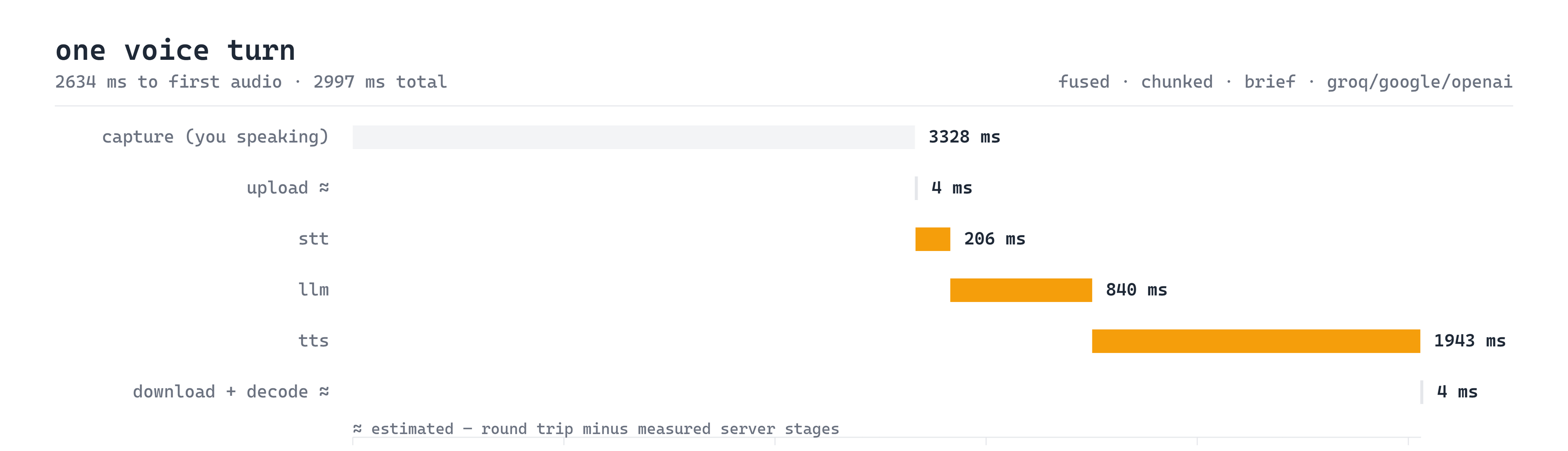
By combining Groq's 206ms STT transcription with sentence-level parallel TTS chunking, time to first audio drops to just 2634ms with a total turn processing time of 2997ms. Here is the video recording of this exact optimized pipeline in action on the voice console:
At this point, the single-server setup is complete: a browser can hold a fluid, low-latency voice conversation with the backend. But building a system that works for one user is very different from scaling it for thousands—which brings us to the next major challenge.
The Load Balancer Problem Nobody Talks About
The moment you try to scale this architecture across multiple backend servers, you hit a fundamental infrastructure bottleneck: standard cloud load balancers can't route WebRTC traffic.
An AWS ALB is great at routing HTTP requests. But a voice session is a long-lived stream of UDP packets, and every packet from one user must reach the same backend server—the one holding that user's WebRTC session state, their Opus decoder, and their conversation history. There are no cookies, no headers, no session affinity tricks. Just raw UDP datagrams arriving at a public IP.
I had built an HTTP load balancer from scratch before, so I thought I understood load balancing. This was a completely different beast. The relay needs to answer one question for every incoming packet: which backend owns this user?—and it needs to answer it in microseconds, without holding any session state of its own.
Sticky sessions in the HTTP world are a lookup on something the request carries. UDP carries nothing. So either the relay keeps a session table of its own—and becomes the stateful thing you were trying to avoid, with all the failover questions that follow—or the routing information has to be inside the packets.
OpenAI's solution turns the problem upside down: rather than making the relay look up session state, they force incoming packets to carry their own destination address inside STUN authentication headers.
Self-Routing Packets: Smuggling Destination IPs into Media Headers
When a browser starts a WebRTC connection, the very first UDP packet it sends is a STUN Binding Request. Inside that packet is a USERNAME attribute containing the ufrag (username fragment)—normally just a random string used for ICE authentication.
The hack: it doesn't have to be random.
When the browser first does HTTP signaling, the backend server that will own the session encodes its own IP address and port into the ufrag it hands back in the SDP answer. The browser, following the WebRTC spec faithfully, then echoes that ufrag inside its first STUN packet to the relay. The relay cracks the packet open, decodes the backend's address out of the username, and now knows exactly where to forward everything.
The entire backend address compresses into just seven bytes:
Byte 0 is a version marker, four bytes hold the IPv4 address (10.0.0.7), and two bytes hold the port (7001). Base64-encoding these seven bytes produces a compact 10-character string (AQoAAAcbWQ) that looks like any standard random WebRTC string.
Extracting the address on the relay side is surprisingly simple. Every STUN handshake packet opens with a standard 20-byte header. The relay checks the header to verify it is a valid STUN message, reads the username attribute, and base64-decodes the target IP and port. The entire parser is about twenty lines of plain Go with zero external dependencies.
Why is this design so elegant? The relay never needs to store session data in a database up front. Instead, its routing table is built dynamically from the packets themselves. If a relay server crashes and restarts, its routing table instantly rebuilds itself from the very next STUN packet each browser sends. The session state lives inside the protocol, making the relay resilient and stateless.
With this self-routing mechanism in place, building the actual relay becomes straightforward.
The Relay: A Phonebook and a Read Loop
A UDP Relay is a lightweight, stateless forwarding station running at a public IP address. Instead of maintaining complex session state or parsing audio payloads, the relay relies on three minimalistic components working together:
- The Single UDP Socket: Operates on a single public port, receiving raw UDP datagrams from thousands of concurrent browser sessions.
- The Read Loop: A tight, non-blocking Go loop that continuously reads incoming datagrams off the socket.
- The Phonebook (In-Memory Routing Table): A concurrent-safe map (
Browser Address ↔ Backend Address) that tracks which backend server owns each active session.
When a packet hits the socket, the read loop routes it through one of two execution paths:
- The Fast Path (Cache Hit): Over 99.9% of packets are 20ms Opus audio frames. The relay looks up the sender's address in the Phonebook, finds the assigned backend, and immediately forwards the packet via
WriteToUDPwith zero memory allocation. - The Slow Path (Cache Miss): On the initial STUN handshake packet, the Phonebook has no entry yet. The relay decodes the target backend IP and port from the STUN username header, saves the route into the Phonebook, and forwards the packet.
- The Return Path: Audio flowing back from backend servers to the browser looks up the same Phonebook table in reverse.
The diagram below illustrates this complete architecture:
Why drop unknown packets instead of erroring? On raw UDP, there is no connected peer to return an error to. Anything arriving before a valid STUN handshake is either out of order or garbage, and the browser will automatically retransmit STUN packets anyway. Dropping unknown packets is the correct network behavior, not a shortcut.
The thing I didn't expect was how small the relay stayed. All the difficulty had moved into the encoding scheme, and the code that used it became almost trivial. That trade—think harder about the data so the code gets dumber—is the one I keep taking from this project.
What's Next?
The current system is a working miniature, not a production deployment. The obvious next steps:
- Barge-in support: Detect when the user starts talking over the AI and cancel the in-flight TTS
- Multiple transceivers behind one relay: The routing design supports it; I want to actually load-test it
- Jitter buffering on the inbound path: right now packet reordering is handled by "hope"—a real jitter buffer would trade a few milliseconds for smoother playback
- Metrics: Per-stage latency histograms (STT finalization, first LLM token, first TTS frame) to see exactly where the milliseconds go
Building this made WebRTC stop being a magic black box for me the same way building a load balancer demystified HTTP infrastructure. If you've ever wondered how voice mode actually works, I genuinely recommend building a miniature—the spec-level details like STUN attribute parsing sound intimidating and turn out to be twenty lines of Go.
Want to discuss WebRTC, Go, or voice AI? Feel free to reach out at hire@codewarnab.in