Architecting an Autonomous Browser AI Agent with WebMCP
- Published on
- Arnab Mondal--14 min read
Overview
- Overview
- 1. Introduction & Motivation
- 2. Project Demo & Video Showcase
- 3. High-Level AI System Architecture
- 4. WebMCP Protocol & In-Browser Tool Execution Engine
- 5. Security & Human-in-the-Loop (HITL) Tool Approval Engine
- 6. Dual MCP Architecture: Stdio Backend, CLI Bridge & Remote OAuth Integration
- 7. Privacy-First Data Architecture & Multi-Provider Model Engine
- 8. Super Memory & Context Retrieval Engine
- 9. Conclusion & Future Roadmap
TL;DR
Cognito AI is a privacy-first browser extension agent built with WXT and React 19. It combines WebMCP for in-browser tool execution, Human-in-the-Loop (HITL) approval safeguards for secure actions, dual Stdio and Remote MCP client connectivity, and local-first memory management.
1. Introduction & Motivation
So where it all started is when I saw this video on my X (formerly Twitter) feed. As a hackathon geek, I immediately got interested in it and started to think about what I could build for this hackathon—something I would like to use, not just a one-time project, but something that can be used for real-world applications.
So from there, I started working on this project, and the idea was to build an autonomous browser AI agent that could be used to automate tasks and solve problems on the web. Over time, I upgraded it more and more to make it even more useful for my daily workflow. Eventually, after lots of upgrades, I submitted the project to Kiroween as well.
2. Project Demo & Video Showcase
Before diving deep into the architecture, let's first watch the video attached below—this is the project demonstration submitted for the Kiroween hackathon. If you want to see a more stylized, edited video of the earlier version submitted for the Chrome Built-in AI Challenge 2025, you can watch that video here.
3. High-Level AI System Architecture
To understand how Cognito AI orchestrates autonomous browser interactions while ensuring complete user control, let's analyze the core AI System Architecture.
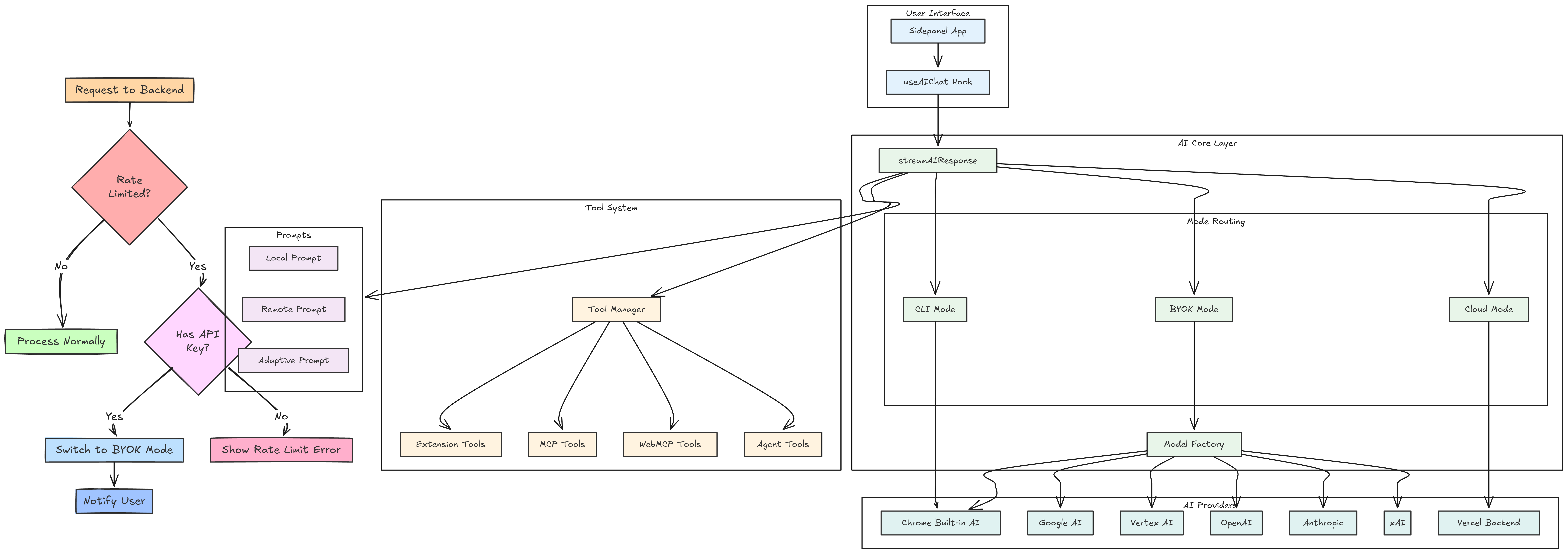
The system is structured into four primary operational boundaries:
- User Interface Layer: Sidepanel and Popup UI constructed with React 19 and Tailwind CSS, communicating state through real-time message passing.
- Background Service Worker Core: Developed using WXT, handling background event loops, context retrieval, tool scheduling, and LLM communication.
- Execution Engine and MCP Bridge: Translates WebMCP and Model Context Protocol (MCP) standard definitions into executable browser capabilities and connects to local or remote endpoints.
- Security and Human-in-the-Loop Gatekeeper: Inspects tool call requests, evaluates risk factors, and requires explicit user authorization before executing sensitive payloads.
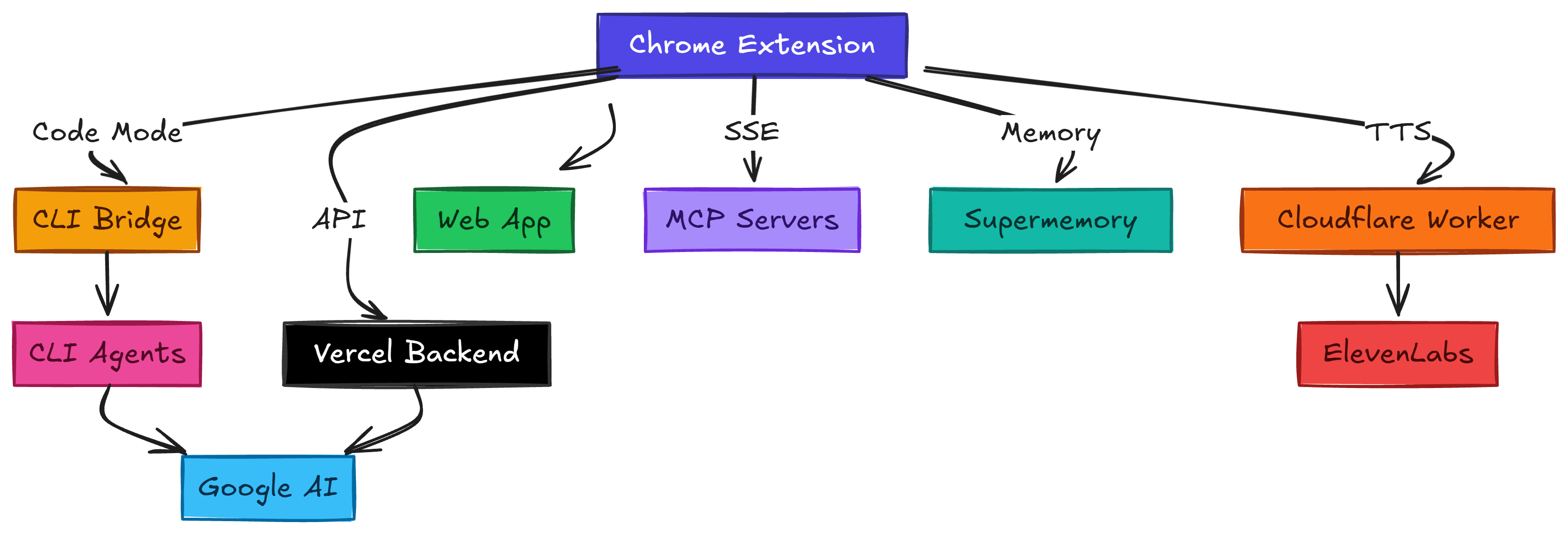
Below is the complete architectural topology illustrating data flows across storage layers, background processes, and external LLM services:
4. WebMCP Protocol & In-Browser Tool Execution Engine
The core technical foundation of Cognito AI is built around the Web Model Context Protocol (WebMCP). Instead of relying on server-side headless browsers (such as Playwright or Puppeteer) or brittle, error-prone DOM interactions, WebMCP enables web applications and extensions to expose native capabilities directly to AI models inside the browser runtime via document.modelContext (formerly navigator.modelContext).
When a web page initializes WebMCP using @mcp-b/global, client-side React components declare tools using strongly typed Zod schemas. Cognito AI's extension background worker automatically discovers these exposed tools on active tabs, converts them on the fly into LLM-compatible function declarations (such as Gemini or Claude tools), and routes execution directly back to the active browser tab with zero backend latency, complete local privacy, and skipping unreliable DOM scraping entirely.
WebMCP Architecture & Execution Flow
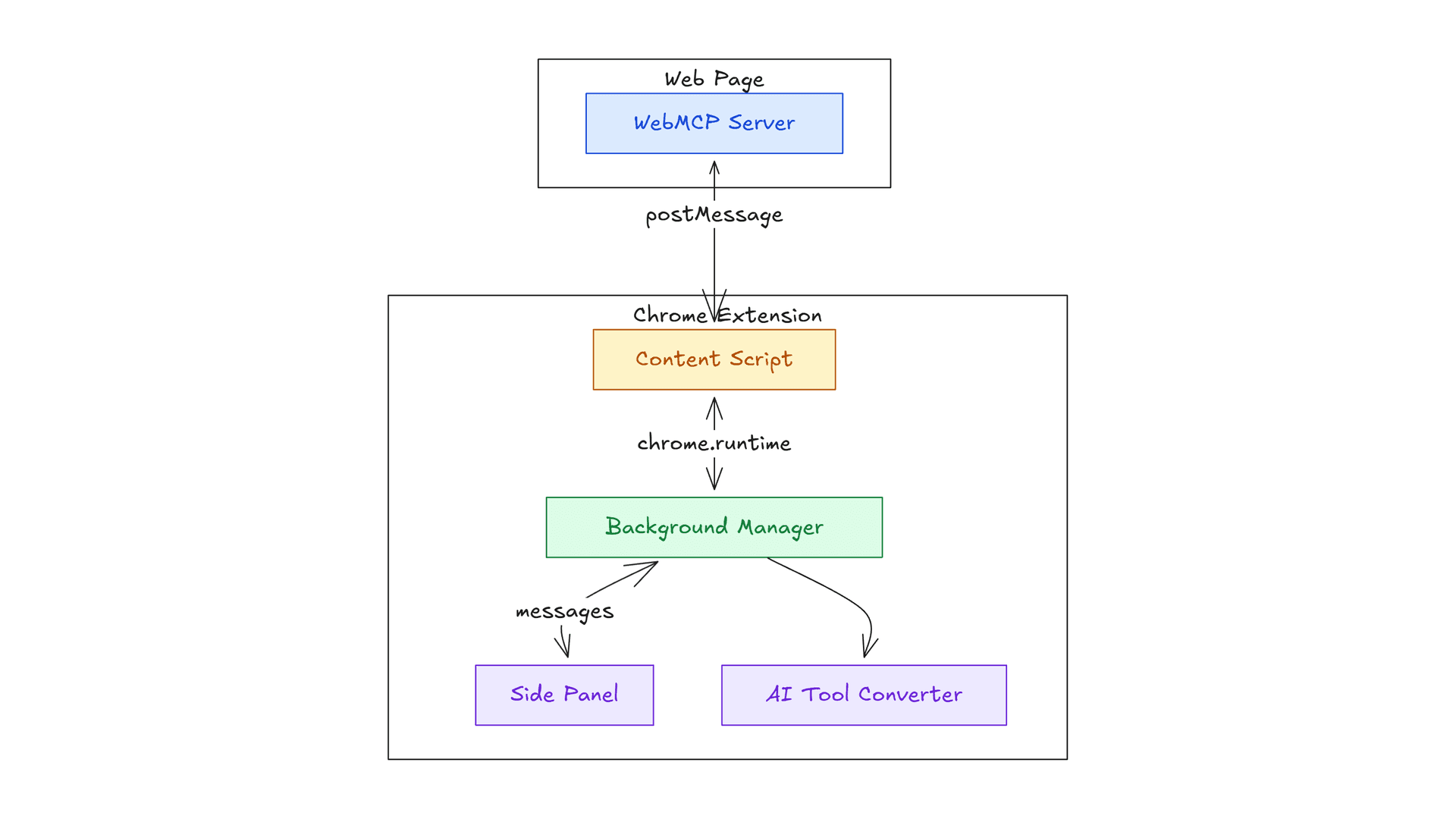
WebMCP Architecture Overview: Exposing in-browser tools to AI Agents
5. Security & Human-in-the-Loop (HITL) Tool Approval Engine
Giving an AI agent direct control over browser interactions creates significant security challenges—from accidental form submissions to unauthorized script execution. Cognito AI solves this with a multi-layered security engine that classifies tool actions based on risk and enforces synchronous Human-in-the-Loop (HITL) authorization for sensitive operations. Safe, read-only tools like tab navigation run seamlessly, while state-mutating actions—such as text input, element clicks, script execution, or screen captures—automatically trigger an approval gatekeeper.
When a high-risk tool is invoked, Cognito AI pauses execution in the background service worker using an internal promise bridge while keeping the model loop intact. An interactive approval prompt lets users approve the action once, allow it for the current website domain, or persist global authorization rules in local storage. Additionally, all credentials remain local-first in extension storage, and the Node-based CLI bridge strictly validates browser extension origin headers to block unauthorized cross-origin requests from external web pages.
Security & Tool Approval Engine Architecture
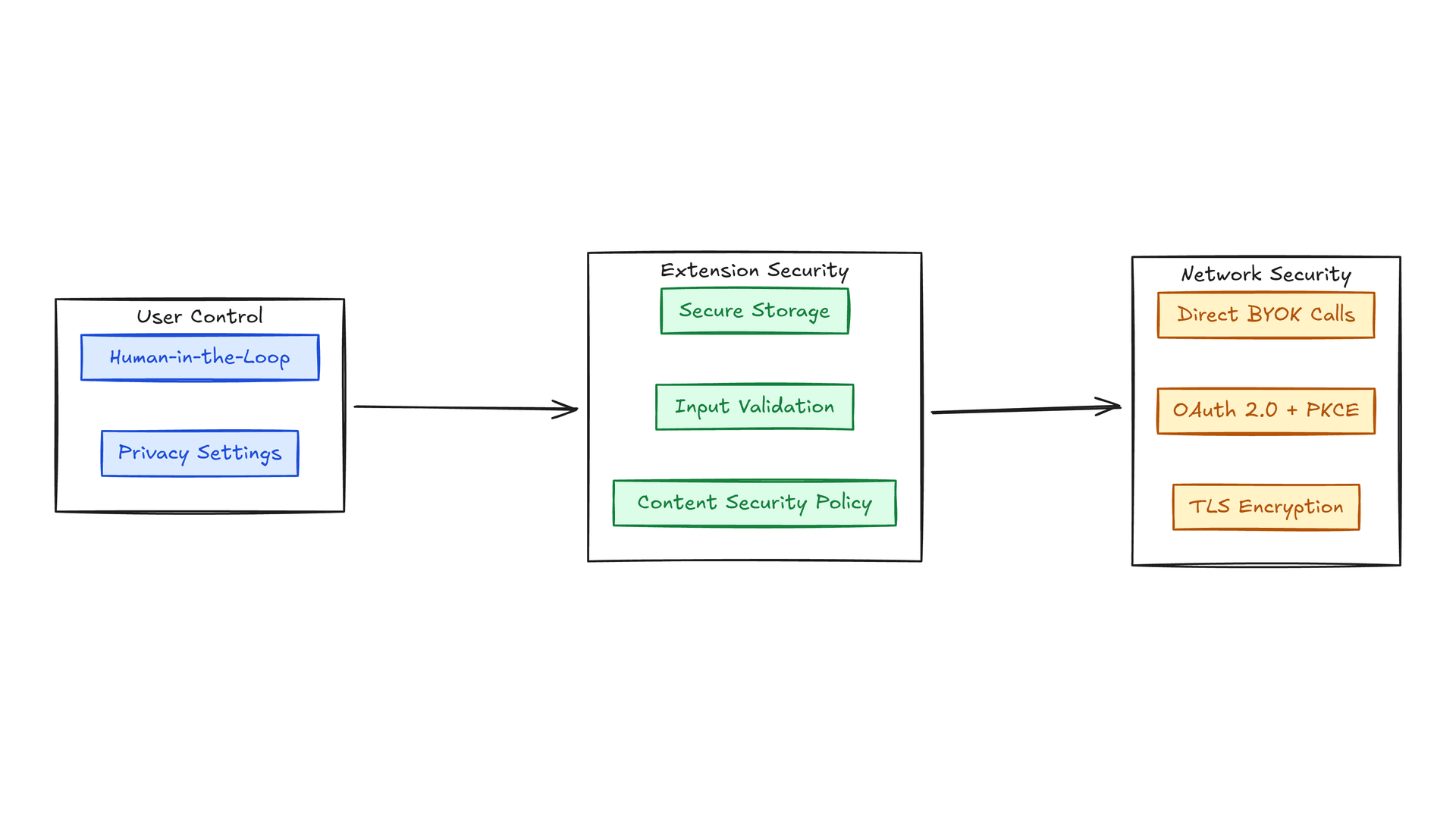
Multi-tiered Security Architecture & Risk Boundaries
6. Dual MCP Architecture: Stdio Backend, CLI Bridge & Remote OAuth Integration
To connect the browser AI with server-side tools, local developer CLIs, and cloud platforms, Cognito AI implements a Dual Model Context Protocol (MCP) architecture. This unifies local and remote capabilities into a single cohesive execution framework.
Dual MCP Topography & Backend Execution Flow
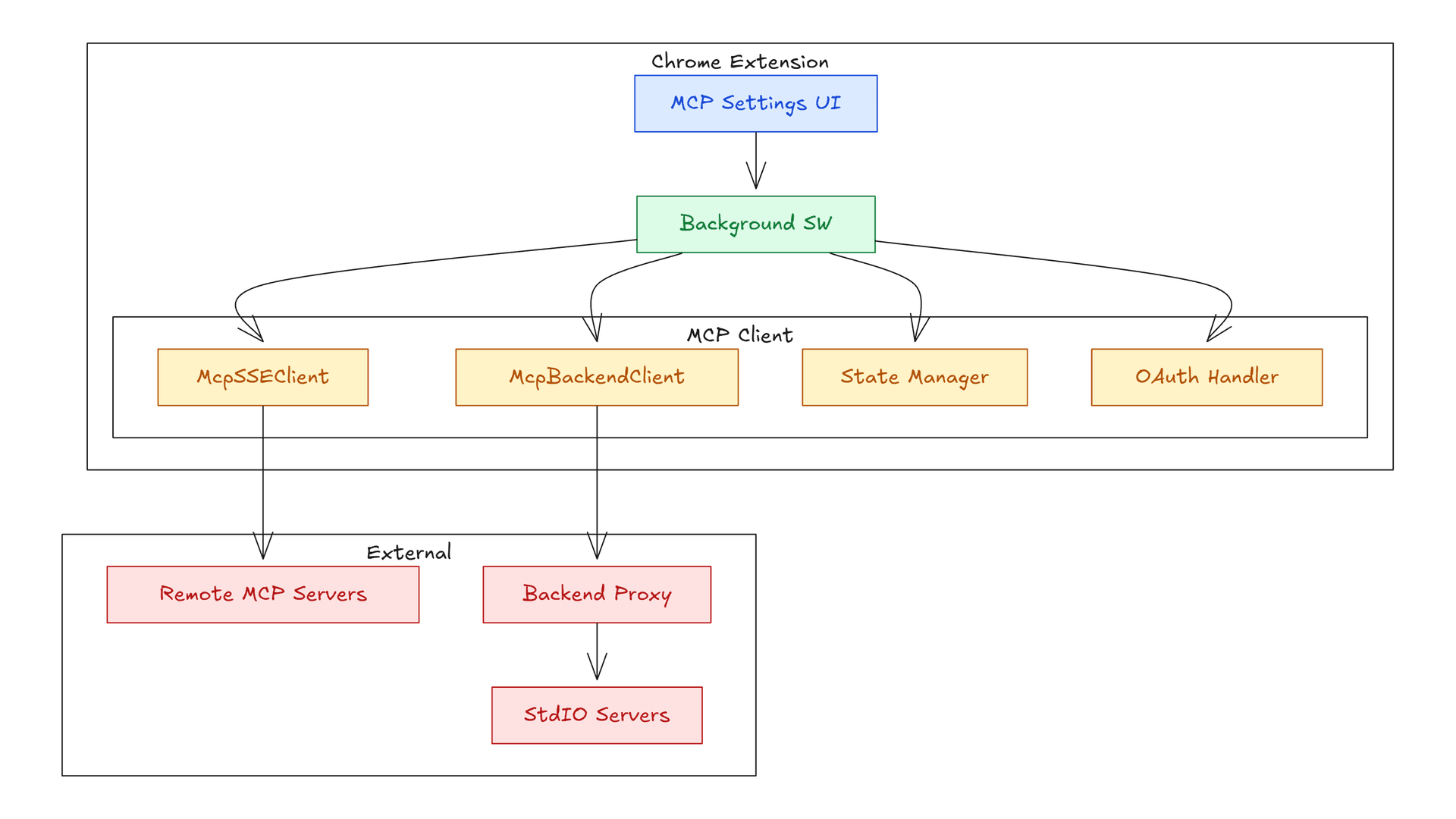
Dual MCP Architecture: Combining Local Stdio and Remote SSE Transports
6.1 Backend Server & Stdio MCP Process Execution
Executing Stdio-based tools required server-side process isolation. Chrome extensions operate inside sandboxed browser workers and cannot directly spawn native operating system child processes.
To handle this, Cognito AI connected to a dedicated backend server designed to execute Stdio MCP tools. When the extension requested a tool action, the backend looked up the tool in a secure registry, spawned the process, piped stdin and stdout streams, logged request payloads, and streamed execution results back to the extension with Human-in-the-Loop (HITL) approval safeguards.
While architecting this backend executor, I evaluated isolated cloud sandboxing platforms like Vercel Sandbox and Daytona to run untrusted tool processes inside ephemeral remote containers. Although I ultimately skipped cloud runners for the initial backend implementation, evaluating containerized execution established key isolation boundaries. Although the backend server is private, the implementation details are shared in the project documentation on GitHub, enabling anyone to build and deploy a compatible backend setup.
6.2 Local CLI Bridge for Developer Agents
In addition to backend tool execution, I built cognito-cli-bridge—a separate local Node.js bridge server running on http://127.0.0.1:8787 designed to connect browser extension tools to local terminal coding agents like Gemini CLI, Claude Code, and Codex CLI.
The primary motivation for building the CLI bridge was user convenience: it allows developers to connect their browser agent to local coding tools and utilize their existing CLI subscriptions directly without needing separate API keys.
The bridge automatically configures local MCP settings files (such as ~/.claude/mcp.json or ~/.gemini/settings.json) and exposes browser capabilities to terminal agents over HTTP and SSE, while securing requests with local Origin validation and token authentication.
6.3 Remote SSE MCP & The OAuth Integration Nightmare
For cloud services like Notion and GitHub, Cognito AI connects directly via Server-Sent Events (SSE) and HTTP streamable transports. The authentication engine implements RFC 9728 (Protected Resource Metadata), RFC 8414 (Auth Server Metadata), RFC 7591 (Dynamic Client Registration), RFC 8707 (Resource Indicators), and PKCE authorization code grants.
However, implementing the MCP OAuth specification in practice was a major headache. Even though OAuth 2.0 is a published standard, third-party providers rarely implement the specification consistently:
- Non-Standard Query Parameters: Platforms often require vendor-specific query parameters (such as Notion requiring an unexpected owner=user flag) during authorization.
- Inconsistent Challenge Headers: Remote endpoints frequently format 401 Bearer challenge headers incorrectly, breaking standard discovery logic.
- Missing Metadata & Token Quirks: Well-known discovery endpoints are often missing, and dynamic client registration endpoints frequently return non-standard JSON payloads or omit refresh tokens.
To make remote integrations reliable, Cognito AI includes a resilient auth handler that parses non-standard challenge headers, injects per-provider overrides, and falls back to Personal Access Tokens (PAT) when standard OAuth flows fail.
7. Privacy-First Data Architecture & Multi-Provider Model Engine
Privacy and user data sovereignty are core architectural principles of Cognito AI. In Bring Your Own Key (BYOK) mode, user API keys (for Gemini, Claude, OpenAI, Grok, or Vertex AI) are saved exclusively inside local chrome.storage.local—outgoing API requests are initiated directly from the extension to the provider's API endpoints, meaning your credentials are never sent to any intermediate backend server. All conversation history and research threads remain on-device in an IndexedDB database via Dexie.js, while settings reside in local storage backed by a 5-second TTL in-memory cache. To give users total flexibility, Cognito AI seamlessly routes between Local Mode (on-device Chrome Built-in AI), BYOK Mode (direct provider APIs), and Cloud Mode, automatically failing over to BYOK Mode if backend cloud rate limits are reached.
Privacy Architecture, Data Flow & Storage Topology
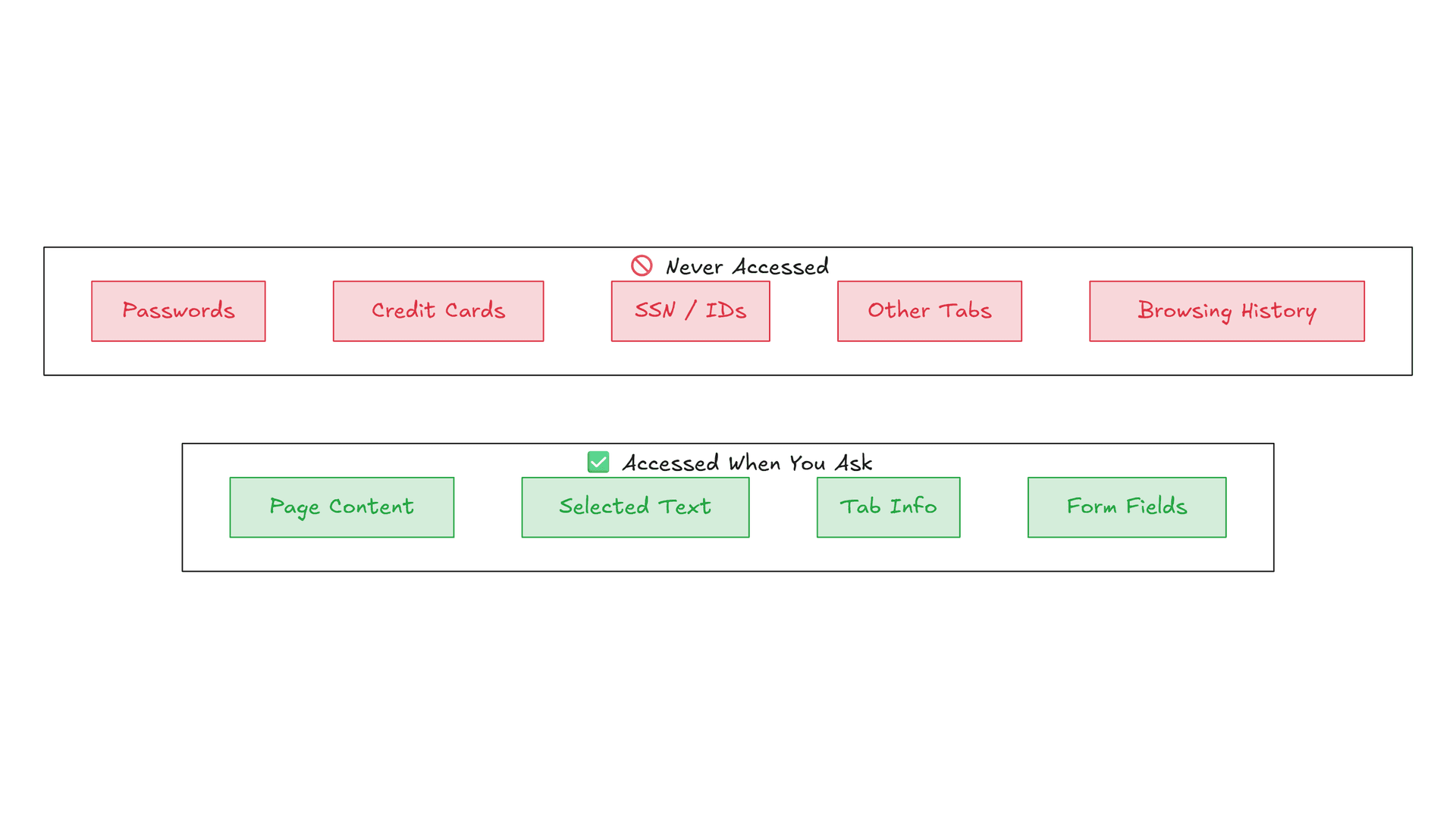
Strict Data Boundaries: Categorizing Never-Accessed Data vs User-Requested Context
8. Super Memory & Context Retrieval Engine
To prevent conversational context loss across long browsing sessions, Cognito AI integrates a persistent memory pipeline powered by Supermemory. Using the withSupermemory model wrapper from the AI SDK, the extension automatically ingests memory sources—including chat conversations, writing tasks, rewriter outputs, and summarization requests—extracting key facts into an indexed Knowledge Graph. When initialized, the extension checks local storage for Supermemory credentials and wraps the model instance on the fly, enabling semantic search retrieval that dynamically injects relevant past memories directly into the LLM context window.
I also contributed to Supermemory via Pull Request #599 to add browser support for passing API keys directly via options.
Super Memory Architecture & Fact Extraction Dataflow
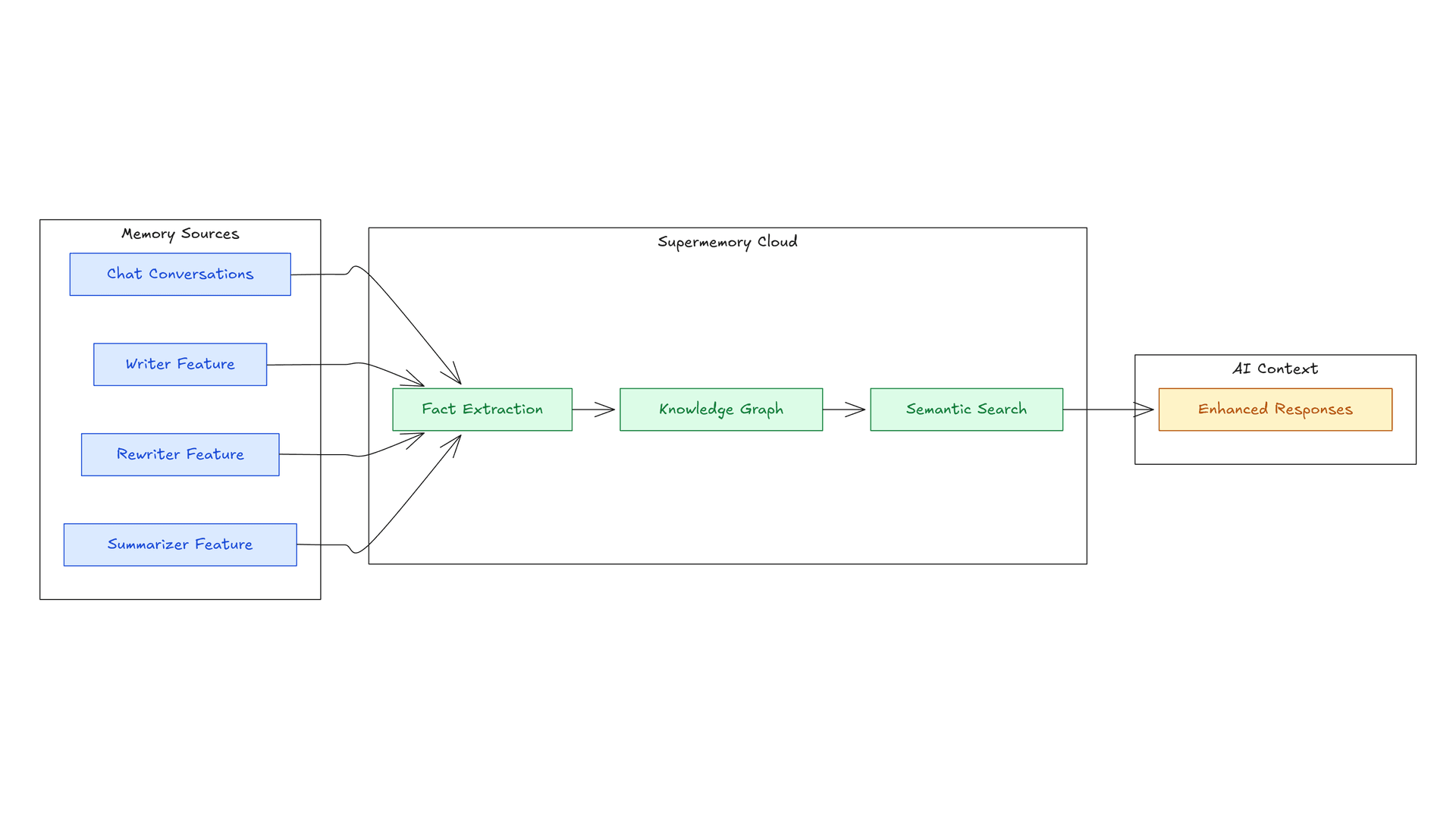
Super Memory Architecture: Ingesting Memory Sources into Fact Extraction and Knowledge Graph
9. Conclusion & Future Roadmap
Building Cognito AI has been an exciting journey in pushing the boundaries of what is possible with in-browser AI agents. By combining the Web Model Context Protocol (WebMCP), Human-in-the-Loop approval safeguards, dual Stdio and Remote MCP client connectivity, and a privacy-first local storage model, Cognito AI transforms the Chrome browser into an autonomous, secure AI assistant.
Looking ahead, the roadmap focuses on expanding local tool ecosystems, deepening WebMCP browser integrations, enhancing multi-agent orchestration, and refining real-time voice and multimodal interaction capabilities. All core components are open source, and I welcome contributions from the community to help shape the future of autonomous web assistants.
Available for hire - If you're looking for a versatile full-stack engineer with expertise across AI systems, web architecture, and scalable infrastructure, feel free to reach out at hire@codewarnab.in